

RGB vs ARGB
Should I purchase a RGB or ARGB device?
Section titled “Should I purchase a RGB or ARGB device?”ARGB is superior in terms of customization and lighting performance. If you have the capability to control ARGB devices, either via your motherboard or through an external controller, we recommend purchasing ARGB devices.
If your motherboard doesn’t have any ARGB headers, you have two choices. You can either use RGB devices, or purchase an external controller. External controllers often provide more flexibility in terms of number of devices that they can control. Please consult the Lighting Controllers section of our website before purchasing an ARGB controller to use with SignalRGB.
So what is the difference between RGB and ARGB?
Section titled “So what is the difference between RGB and ARGB?”To put it simply:
12volt RGB means that all the LEDs on a specific device (whether the device is a Fan or LED strip) will be the same color.
5volt ARGB allows multiple colors per device as each LED “pixel” can be addressed separately providing a different color value, allowing greater customization and immersion.
Mirror/Hub behavior
Section titled “Mirror/Hub behavior”Standard 12V RGB (4-pin) headers use a mirroring approach — all LEDs connected to the same header receive the same color signal. You cannot address individual LEDs independently. If you plug multiple RGB fans into a hub daisy-chained to an RGB header, all fans will show the same color at the same time.
ARGB headers that use a “hub” topology (one output feeding multiple devices) work the same way — all devices on that hub share one data signal and will display the same pattern. This is sometimes called a “false daisy-chain.”
Individual behavior (ARGB)
Section titled “Individual behavior (ARGB)”True ARGB (5V, 3-pin) with individual addressing means each LED can display a different color. When connected to a controller or header that supports individual addressing (“true daisy-chain”), each device in the chain is addressable separately. This is what allows effects like gradients, waves, and reactive lighting to span multiple fans or strips correctly.
How do you tell the difference?
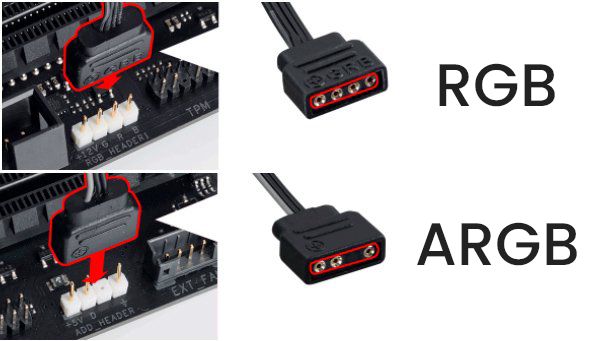
Section titled “How do you tell the difference?”The best way to know immediately is that 12 volt RGB requires a 4 pin connection, while 5 volt ARGB only has 3 pins.
Please see image below for the differences between the two connectors.
Daisy-chain
Section titled “Daisy-chain”Most of the time when you see that a device can be daisy-chained, it will probably be what we call “false” daisy-chain, it will work the same as a hub, sending the same data/signal to all connected devices while on a “true” daisy-chain hub, it will allow individual control of all connected devices on a single port.
Hubs vs Controllers
Section titled “Hubs vs Controllers”A hub is a passive splitter — it takes one ARGB signal and distributes it to multiple devices, but all devices share that one signal (mirror behavior). Hubs are common on many motherboards and in low-cost fan kits.
A controller is an active device with its own USB connection and processor. It can independently address each port, giving you per-device and per-LED control. Controllers supported by SignalRGB appear as their own device in the app and allow full effect customization across all connected devices.
If you want true per-device control over multiple fans or strips, use a supported controller rather than a passive hub.
PWM and USB 2.0 Headers
Section titled “PWM and USB 2.0 Headers”ARGB and RGB lighting headers are separate from PWM fan headers. PWM (4-pin) controls fan speed — it has nothing to do with lighting. Your fans may have two connectors: one for PWM speed control (to the motherboard) and one for ARGB lighting (to an ARGB header or controller).
Most ARGB controllers connect to your PC via an internal USB 2.0 header on the motherboard. If your motherboard has no free USB 2.0 headers, use an internal USB hub (such as the NZXT Internal USB Hub) to add more.