

Utilities
Este conteúdo não está disponível em sua língua ainda.
Device Utilities
Section titled “Device Utilities”device.color()
Section titled “device.color()”This function is your way of fetching color data from the canvas. It takes in an X,Y position relative to and within the device’s pixel buffer on the canvas and returns an [R,G,B] array of the color at that pixel.
| Parameter | Type | Description | Example |
|---|---|---|---|
| X | Int | An Int value representing the X coordinate within the Devices Pixel Buffer | 5 |
| Y | Int | An Int value representing the Y coordinate within the Devices Pixel Buffer | 3 |
- Note: the sent X,Y coordinates must be within the Pixel Buffer set by the Size() Export
| Return | Type | Description | Example |
|---|---|---|---|
| ColorArray | 1D Array | A length 3 array containing the coordinated [R, G, B] values ranging from 0-255 (HEX 00-FF) | [128,158,255] |
Below is a cut-down example of the function being used in a typical situation.
for(var iIdx = 0; iIdx < vLedPositions.length; iIdx++) //For each Led on the device { var iPxX = vLedPositions[iIdx][0]; //Get the X and Y values from the [X,Y] array var iPxY = vLedPositions[iIdx][1]; var col; // create a variable to contain the [R.G.B] array data if(shutdown){ // Check for some settings that can override the Device.color() call col = hexToRgb(shutdownColor) }else if (LightingMode == "Forced") { col = hexToRgb(forcedColor) }else{ col = device.color(iPxX, iPxY); //Calling Device.color with the X and Y values } //Saving the Color data in order into a larger Array of all the LED's data RGBdata[iIdx*3] = col[0]; // Red Channel RGBdata[iIdx*3+1] = col[1]; //Green Channel RGBdata[iIdx*3+2] = col[2]; //Blue Channel TotalLedCount += 1; }device.getBrightness()
Section titled “device.getBrightness()”Returns the devices current brightness level within SignalRGB. This value is already applied to any colors returned by device.color() or similar.
| Return | Type | Description | Example |
|---|---|---|---|
| Brightness | int | Current brightness in the range 0-100 | 42 |
device.getMotherboardName()
Section titled “device.getMotherboardName()”Returns the WMI name of the current systems motherboard.
| Return | Type | Description | Example |
|---|---|---|---|
| MotherboardName | string | System’s motherboard name | B550 Aorus Elite |
device.pause()
Section titled “device.pause()”This function attempts to pause the device thread for the given length. These pauses are not guaranteed to be exact due to how the operating system handles thread sleeps.
| Parameter | Type | Description | Example |
|---|---|---|---|
| Duration | Int | Requested pause length in milliseconds | 1 |
- Note: Windows has a minimum sleep time of 1-2ms and will start to break down as the sleep gets longer so don’t use these for exact timings.
packet[89] = CalculateCrc(packet); device.send_report(packet, 91); device.pause(1); // We need a pause here (between packets), otherwise the ornata can't keep up.device.set_endpoint()
Section titled “device.set_endpoint()”This function changes the active endpoint for all read and write commands. This is useful for devices that have multiple open endpoints for different commands. A common example of this is Logitech devices which have an RGB data endpoint and a system command endpoint for things like DPI settings.
| Parameter | Type | Description | Example |
|---|---|---|---|
| interface | HEX | An 0x Hex value representing the interface of the endpoint to open | 0x0002 |
| usage | HEX | An 0x Hex value representing the usage of the endpoint to open | 0x0006 |
| usage_page | HEX | An 0x Hex value representing the usage_page of the endpoint to open | 0x0080 |
| collection | HEX | An 0x Hex value representing the collection of the endpoint to open | 0x0001 |
function Apply(){    var packet = [];
    packet[0] = 0x11;    packet[1] = 0xFF;    packet[2] = 0x0C;    packet[3] = 0x5E;
    device.set_endpoint(1, 0x0602, 0xff43); // System Interface    device.write(packet, 20);}
device.log()
Section titled “device.log()”This function is the plugin’s version of console.log. It takes in a String, Number, Object, or Array and logs it in the device’s console for debugging and user information. This can be especially useful to list things like DPI changes, errors, or during development to show your packets layout or input from read commands.
- Note: This function will try to convert JavaScript variables to strings where It can. Logging JavaScript Template Literals using parseInt(), toString(), or JSON.stringify can give you more control over conversion and formatting.
| Parameter | Type | Description | Example | Default |
|---|---|---|---|---|
| Item | Javascript Value | A string, number, array or other JavaScript value to be logged | ||
| Options | JavaScript Object | A Javascript object containing setting parameters | {hex: True} | {} |
| Options | Description | Type | Default |
|---|---|---|---|
| Hex | Sets if integers should be printed in decimal or hex format | Boolean | False |
| toFile | Sets if the printed items should appear in debug logs, or just the device’s console | Boolean | False |
let ImportantData = "i have really important info here"; device.log(ImportantData, {toFile: true})Alerts
Section titled “Alerts”Alerts can be used to visible prompt the user if there’s an issue with their device. These should be used sparingly and reserved for show stopping issues like devices not being configured properly.
device.notify()
Section titled “device.notify()”Creates an new alert for the user. The return value can be used to selectively remove the alert and should be done if the user fixes the alerted issue.
| Alert Priority | Description | Value |
|---|---|---|
| Info | Normal Alert | 0 |
| Important | Critical (Highlighted) Alert | 1 |
| parameter | type | description | Example |
|---|---|---|---|
| Title | String | Alert Title | Firmware Incompatible |
| Description | String | Alert Description | Firmware Version must be >= 2.0.0 |
| Priority | Int | Alert Priority | 0 | 1 |
| return | type | description |
|---|---|---|
| AlertId | String | The created alerts Id string |
let Alertid = device.notify("Really Important Issue", "Please Fix", 1);device.denotify()
Section titled “device.denotify()”Removes the given alert if it exists.
| parameter | type | description |
|---|---|---|
| AlertId | String | AlertId returned by device.notify |
let Alertid = device.notify("Really Important Issue", "Please Fix", 1); // Do stuff and recheck if the alerted issue is fixed device.denotify(AlertId);Messages
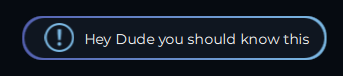
Section titled “Messages”Device messages provide a way to relay important, but not show stopping information to the user. These messages will only appear on the device’s page
device.addMessage()
Section titled “device.addMessage()”Adds a new device message with the given MessageId.
| parameter | type | description | example |
|---|---|---|---|
| messageId | string | MessageId tied to the device message | ”mymessage” |
| message | string | message text to be displayed | ”The message” |
| tooltip | string | addition text displayed on hover | ”Some more info” |
device.addMessage("message1", "Hey Dude you should know this", "Here's some extra info about it too");device.removeMessage()
Section titled “device.removeMessage()”Removes the message created with the given MessageId if one exists.
| parameter | type | description |
|---|---|---|
| messageId | string | MessageId to be removed |
device.addMessage("message1", "Hey Dude you should know this", "Here's some extra info about it too");
  // message is no longer relevant  device.removeMessage("message1");